
What Is IPTV Smarters Pro on Android?
IPTV Smarters Pro is a next-generation IPTV app designed to give users easy access to their IPTV subscriptions. Unlike typical streaming apps, IPTV Smarters Pro doesn’t host any content itself. It’s an IPTV player that acts as a bridge between your IPTV provider and your Android device.
Originally built to simplify IPTV setup on smartphones and smart TVs, IPTV Smarters Pro quickly became an industry standard thanks to its intuitive interface, multi-device compatibility, and advanced features. In just a few minutes, anyone can install IPTV Smarters Pro on Android, enter their login details (M3U or Xtream Codes), and start streaming thousands of live TV channels, movies, and series.
👉 The app is available as a downloadable APK from the official website iptvsmarters.com, and also through the Google Play Store in some regions.
That makes it accessible even when other IPTV players are restricted or incompatible.
Why the App Is So Popular in 2025
In 2025, IPTV Smarters Pro has established itself as one of the best IPTV apps for several reasons:
- Universal compatibility: IPTV Smarters Pro runs on Android (smartphones, tablets, TV boxes), Fire Stick, Windows, macOS, and smart TVs. That flexibility has attracted a massive user community.
- Streamlined user interface: with a clean, modern design, IPTV Smarters Pro offers intuitive navigation, even for beginners.
- Full support for IPTV formats: whether your provider gives you an M3U link, Xtream Codes credentials, or a custom portal, IPTV Smarters Pro handles it all.
- Premium features: multi-screen playback, built-in VOD, EPG (TV guide), parental controls, custom subtitles, and 4K/UHD support.
- Reliability and regular updates: unlike some abandoned apps, IPTV Smarters Pro is updated frequently, ensuring stability and security.
👉 For many IPTV subscribers, installing IPTV Smarters Pro on Android has become the first thing they do as soon as their IPTV subscription is activated.
How It Compares to Other IPTV Players (Smart IPTV, TiviMate, IBO Player)
There are plenty of IPTV players on the market, but IPTV Smarters Pro clearly stands out from the competition.
- IPTV Smarters Pro vs Smart IPTV (SIPTV):
Smart IPTV is one of the oldest players and is very popular on Samsung and LG smart TVs. But it usually requires a one-time activation fee, while IPTV Smarters Pro is free to download. IPTV Smarters Pro also offers a more modern interface and advanced options like multi-screen and VOD, which SIPTV lacks. - IPTV Smarters Pro vs TiviMate:
TiviMate is a favorite among Android TV box users for its smooth performance and customization. However, the full version requires a paid Premium subscription. IPTV Smarters Pro, on the other hand, offers many features for free, making it a more accessible alternative. - IPTV Smarters Pro vs IBO Player:
IBO Player is a capable app with good multi-device compatibility, but it’s mostly used on smart TVs. IPTV Smarters Pro shines with its versatility: Android, iOS, Windows, Fire Stick… it covers every platform, making it a more universal choice.
👉 In short, IPTV Smarters Pro combines a free price tag, universal compatibility, and a feature-rich interface, making it one of the most popular IPTV players in 2025.
IPTV Smarters Pro is much more than a basic IPTV player. Thanks to its simplicity, wide range of features, and accessibility, it has become a go-to choice in 2025 for IPTV users on Android and other devices. Whether you’re a beginner or a power user, installing IPTV Smarters Pro is one of the best ways to get the most out of your IPTV subscription.
Why Choose IPTV Smarters Pro on Android?
Broad Compatibility (Smartphone, Tablet, and Android TV Box)
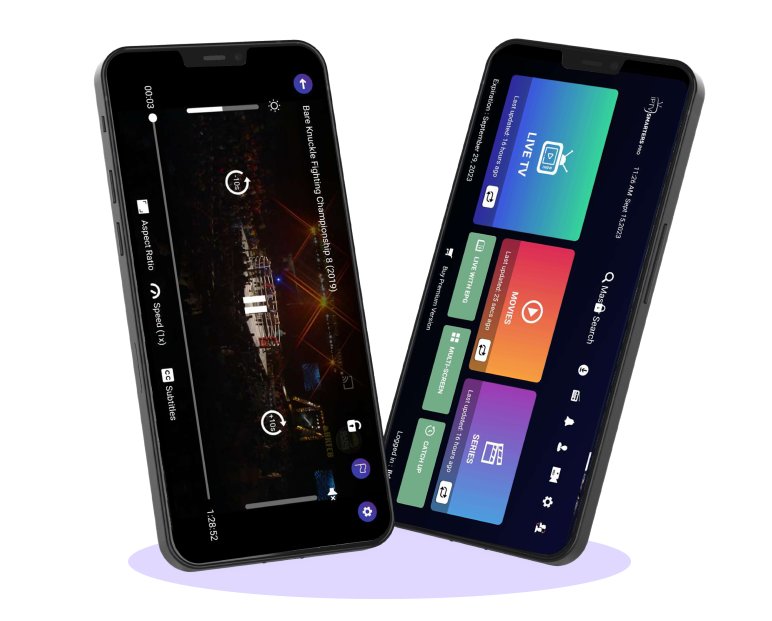
One of the biggest advantages of IPTV Smarters Pro is that it works with almost every Android device. Whether you use a smartphone, a tablet, or an Android TV box, the app installs easily and turns any screen into a connected TV.
- On an Android smartphone, IPTV Smarters Pro makes it easy to watch your IPTV channels anywhere.
- On a tablet, it becomes the ideal portable media player for adult VOD, sports, or movies.
- On an Android box (Xiaomi, Nvidia Shield, etc.), IPTV Smarters Pro delivers a smooth TV experience, close to that of a professional IPTV box.
👉 This multi-device flexibility is what makes IPTV Smarters Pro a top choice for Android users.
A Simple, Intuitive Interface
Another strength of IPTV Smarters Pro is its clean, user-friendly interface. Unlike some complicated IPTV apps, its design makes navigation easy, even for first-time users.
- Channels are organized by category (sports, movies, adult channels, documentaries, and more).
- The menu is well designed, with shortcuts to quickly jump to Live TV, VOD, series, or the EPG.
- Users can create favorites and organize their playlists however they like.
👉 In just a few taps, installing and using IPTV Smarters Pro is a breeze.
Support for M3U Playlists and Xtream Codes
A key strength of IPTV Smarters Pro is its support for the two most widely used IPTV access formats:
- M3U playlist: ideal for loading a full channel list from a single link.
- Xtream Codes API: a more stable method that uses a server + username + password for a fast, reliable connection.
Whichever method your IPTV provider uses, IPTV Smarters Pro supports both, giving you instant, hassle-free access to your channels and movies.
👉 This universal compatibility is why almost every IPTV provider recommends IPTV Smarters Pro to its Android customers.
Advanced Features (EPG, VOD, Multi-Screen, Parental Controls)
On top of its simplicity, IPTV Smarters Pro offers advanced features that set it apart from other IPTV players:
- EPG (TV Guide): lets you see what’s on now and what’s coming up, just like a traditional cable box.
- VOD (Video on Demand): the app gives you access to the movies and series included in your IPTV subscription.
- Multi-screen: some IPTV subscriptions let you watch several channels at the same time. IPTV Smarters Pro supports this feature on Android.
- Parental controls: essential for blocking access to sensitive content (adult channels, for example).
👉 Thanks to these features, IPTV Smarters Pro isn’t just a basic IPTV player; it’s a true all-in-one media platform.
Reliability and Regular Updates
Many IPTV apps are abandoned after a few years, which leads to compatibility issues. With IPTV Smarters Pro, it’s the opposite: the app receives frequent updates that fix bugs, improve stability, and add new features.
👉 The result: Android users know they can install IPTV Smarters Pro with confidence, because the app is maintained by an active development team.
⚡ Section takeaway
Choosing IPTV Smarters Pro on Android guarantees a complete, smooth, and personalized IPTV experience. Universal compatibility, an intuitive interface, M3U/Xtream Codes support, and advanced features make this app a must-have for every IPTV subscriber in 2025.
How to Install IPTV Smarters Pro on Android
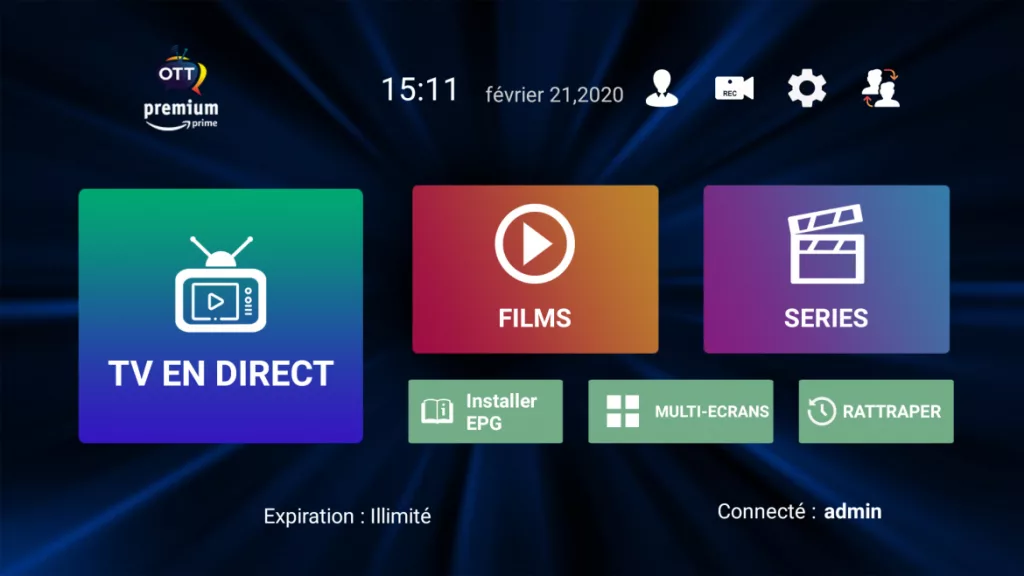
Installing IPTV Smarters Pro on Android is simple, but there are a few different methods depending on whether you use the Google Play Store or the official APK file. Here’s a step-by-step guide to make sure your installation goes smoothly.
1. Download IPTV Smarters Pro from the Google Play Store
The most direct method is to install IPTV Smarters Pro from the Play Store, when it’s available in your region.
- Open the Google Play Store on your smartphone, tablet, or Android TV.
- In the search bar, type “IPTV Smarters Pro”.
- Select the official app published by WHMCS Smarters.
- Tap Install and wait a few seconds.
- Once it’s installed, open IPTV Smarters Pro and set it up with your IPTV login details (M3U or Xtream Codes).
👉 Pro: quick installation, no extra steps.
👉 Con: in some countries, the app may not be available on the Play Store.
2. Install IPTV Smarters Pro via the Official APK
If IPTV Smarters Pro doesn’t show up on the Play Store, you can download the official APK directly from iptvsmarters.com.
- Open the Chrome browser on your Android device.
- Go to the official website and download the IPTV Smarters Pro APK.
- Before installing, go to Settings → Security → Unknown sources and turn on the option to allow manual installation.
- Open the downloaded file (.apk) and follow the installation prompts.
- Launch the app, enter your login details, and enjoy your IPTV channels.
👉 Pro: you can be sure you have the latest official version.
👉 Tip: never download IPTV Smarters Pro from unofficial sites, or you risk getting a modified or infected version.
3. Installing on an Android TV Box
Android boxes (Xiaomi Mi Box, Nvidia Shield, etc.) deliver an experience close to a traditional IPTV box.
- Open the Google Play Store built into your Android TV box.
- Search for IPTV Smarters Pro and install the app.
- If it isn’t available, use the APK method with a USB drive or the Downloader app.
- Once installed, enter your IPTV login details.
👉 With IPTV Smarters Pro on an Android TV box, you get better network stability and video quality optimized for 4K.
4. Initial Setup After Installation
Once IPTV Smarters Pro is installed, you need to enter the details provided by your IPTV provider:
- Option 1: M3U Playlist → enter the full M3U link URL.
- Option 2: Xtream Codes API → enter the server, username, and password.
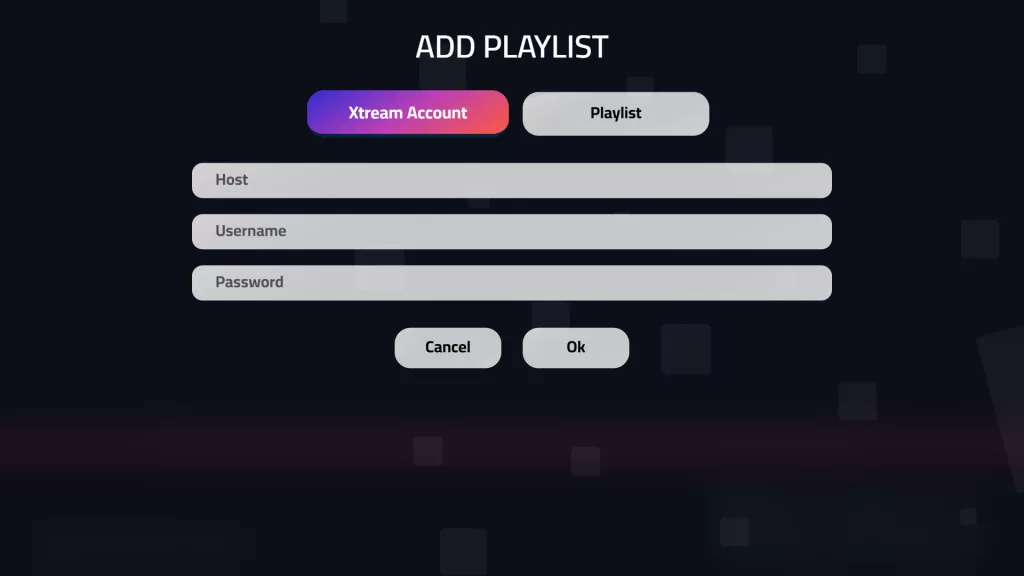
👉 Tip: connecting via Xtream Codes is generally more stable than using an M3U link.
5. Check and Fine-Tune
After installing and setting up IPTV Smarters Pro:
- Check that all your IPTV channels display correctly.
- Test the VOD section (movies and series).
- Turn on the EPG to get the TV guide.
- If you experience buffering, install a VPN to stabilize streaming.
⚡ Section takeaway
Whichever method you choose (Google Play or the official APK), installing IPTV Smarters Pro on Android is quick and easy. In just a few minutes, you can turn your Android device into a true IPTV hub with access to all your channels, VOD, and premium features.
Setting Up IPTV Smarters Pro on Android
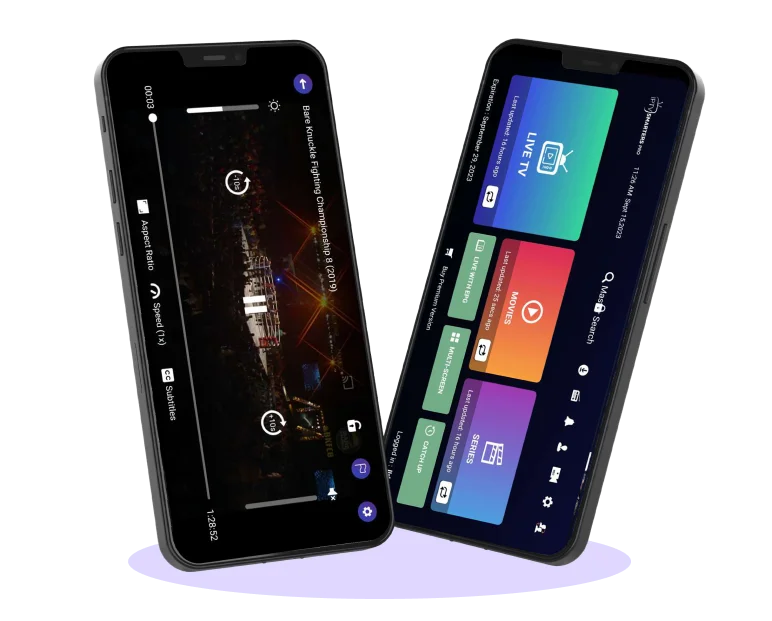
Once the app is installed, setting up IPTV Smarters Pro on Android is essential to fully enjoy all your channels, movies, and series. The advantage of this app is that it supports several connection methods, making it compatible with almost every IPTV provider.
Add an M3U Playlist
An M3U playlist is one of the easiest ways to use IPTV Smarters Pro.
- Open IPTV Smarters Pro on your smartphone or Android TV.
- Choose “Add New Playlist”.
- Select the M3U URL option.
- Enter a playlist name (for example: Premium IPTV Subscription).
- Paste the M3U link provided by your IPTV provider.
- Tap Add, then refresh.
👉 The result: IPTV Smarters Pro automatically loads all your available channels and VOD.
Connect via Xtream Codes API
Many users prefer connecting with Xtream Codes, which is more stable and faster than M3U links.
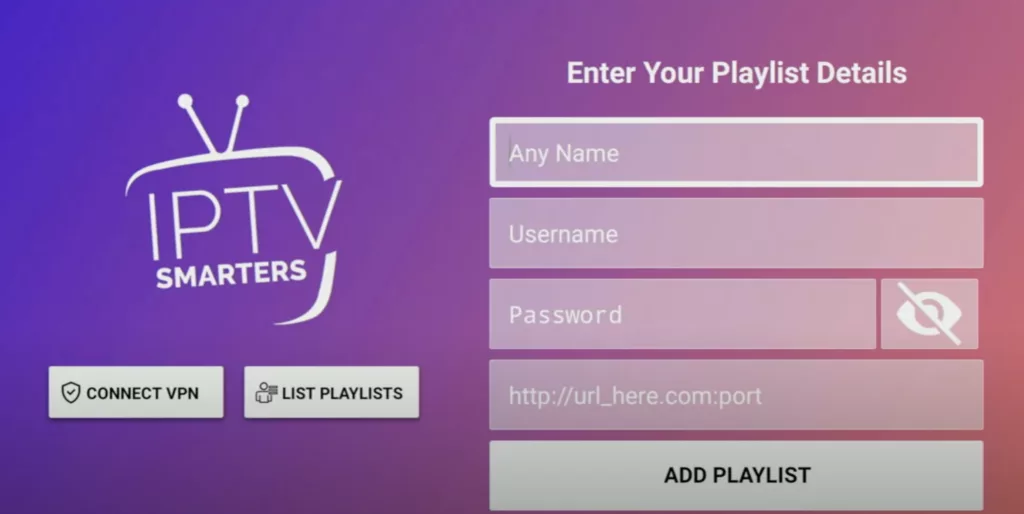
- In IPTV Smarters Pro, choose “Login with Xtream Codes API”.
- Enter the server URL, username, and password you were given.
- Confirm and wait a few seconds.
👉 IPTV Smarters Pro loads your full lineup (Live TV, VOD, series, EPG).
Set Up the EPG (TV Guide)
The TV Guide (EPG) makes the IPTV experience more convenient: you can see what’s on now and what’s coming up next.
- Open IPTV Smarters Pro and go to Settings.
- Add the EPG link provided by your IPTV provider.
- Reload the app: the program guide appears right away.
👉 With IPTV Smarters Pro, the EPG is organized by channel, with descriptions, schedules, and custom alerts.
Create Favorites and Customize the Interface
One of IPTV Smarters Pro’s strong points is customization. You can:
- Create favorites lists (sports, movies, adult channels, and more).
- Rearrange your categories to suit your preferences.
- Turn on parental controls to lock certain sensitive content.
👉 IPTV Smarters Pro turns your Android device into a media center tailored to your needs.
Where to Get an IPTV Subscription That Works with IPTV Smarters Pro
To get the most out of the app, you need a reliable IPTV subscription. Several reputable platforms offer subscriptions that are 100% compatible with IPTV Smarters Pro:
- 🌍 www.iptvxusa.com: specializes in IPTV Smarters Pro in the US, with plans designed for Android and Fire Stick users.
- 🎥 iptv-rapide.com: offers Premium IPTV subscriptions with channels in HD, Full HD, and 4K.
- 📡 iptv-premium-europe.com: ideal for users looking for a stable, multi-screen IPTV subscription that works with IPTV Smarters Pro.
👉 All of these sites offer flexible plans (1 month, 6 months, 12 months) and are a great fit for anyone who wants to install and set up IPTV Smarters Pro on Android without any hassle.
⚡ Setup takeaway
Whether you use an M3U link, Xtream Codes, or the EPG, IPTV Smarters Pro on Android is easy to set up and delivers a complete experience. Paired with a reliable subscription like those offered by www.iptvxusa.com, iptv-rapide.com, or iptv-premium-europe.com, this IPTV player becomes the perfect way to watch all your channels in 2025.
Optimizing IPTV Smarters Pro on Android
Installing and setting up IPTV Smarters Pro is the first step, but to unlock its full potential, you also need to optimize it. In 2025, many Android users want more than just a working app: they want smoother playback, better security, and a more comfortable viewing experience. Here’s how to make it even better.
Use a VPN with IPTV Smarters Pro
When you use IPTV Smarters Pro on Android, turning on a VPN is highly recommended. Why?
- To protect your privacy: IPTV Smarters Pro relies on the internet, and your data can be monitored by your ISP.
- To avoid throttling: some internet providers slow down IPTV streaming, which can affect IPTV Smarters Pro.
- To access all your channels: if some channels are geo-restricted, a VPN combined with IPTV Smarters Pro gets around those restrictions.
👉 With a reliable VPN (NordVPN, Surfshark, ExpressVPN), IPTV Smarters Pro becomes faster, more secure, and unrestricted.
Enable and Manage Multi-Screen
One of the major strengths of IPTV Smarters Pro is its multi-screen support. On Android, you can run several streams at once, which is ideal in a household where everyone wants to watch something different.
Example:
- One person watches a live soccer match.
- Another enjoys a movie on VOD.
- A third browses the documentary channels.
👉 IPTV Smarters Pro handles this smoothly, as long as your IPTV subscription allows multiple simultaneous connections.
Improve Playback and Reduce Buffering
Buffering is a recurring issue with IPTV. On Android, IPTV Smarters Pro offers several settings to minimize it.
- Use a stable internet connection (10 Mbps for HD, 25 Mbps for 4K).
- Use a wired Ethernet connection if you run IPTV Smarters Pro on an Android TV box.
- Close apps that use bandwidth in the background.
- Switch servers in your IPTV settings if one of them is overloaded.
👉 With these optimizations, IPTV Smarters Pro guarantees smooth playback, even with very large playlists.
Adjust Audio and Subtitle Settings
Another strong point of IPTV Smarters Pro on Android is the ability to customize audio tracks and subtitles.
- You can change the audio language to watch movies in their original language.
- You can turn subtitles on or off as you prefer.
- Some settings even let you customize subtitle size, color, and style.
👉 Thanks to these options, IPTV Smarters Pro adapts perfectly to each user’s needs, whether on a smartphone or Android TV.
⚡ Section takeaway
Optimizing IPTV Smarters Pro on Android is key to a smooth, secure, and personalized IPTV experience. With a VPN, multi-screen, fine-tuned audio settings, and a stable connection, IPTV Smarters Pro becomes a complete, must-have IPTV player in 2025.

Common IPTV Smarters Pro Problems and How to Fix Them
Even though IPTV Smarters Pro on Android is a very stable, high-performing app, some users occasionally run into technical issues. The good news is that most of these problems have simple fixes. Here are the most common issues and how to solve them quickly.
Can’t Connect to the Server
A common problem with IPTV Smarters Pro is being unable to connect to the IPTV server. This can be caused by:
- A typo in the URL or your Xtream Codes credentials.
- A server that’s temporarily offline.
- An internet outage.
👉 Fix: Double-check your login details, make sure your internet is working properly, and ask your provider whether the IPTV server is up. IPTV Smarters Pro also includes a built-in connection test to help diagnose the problem.
Buffering and Slowdowns
Buffering is probably the most frustrating issue for IPTV Smarters Pro users. It happens when your internet speed is too low or the IPTV server is overloaded.
👉 Fixes for IPTV Smarters Pro:
- Make sure your internet speed is sufficient (at least 10 Mbps for HD, 25 Mbps for 4K).
- Connect your Android box via Ethernet instead of Wi-Fi.
- Use a VPN to keep your ISP from throttling IPTV streaming.
- Switch servers if your provider offers more than one.
With these tweaks, IPTV Smarters Pro becomes much smoother and more enjoyable to use.
M3U Playlist Won’t Load
Some users report that their M3U playlist doesn’t load properly in IPTV Smarters Pro. There can be several causes:
- The M3U link has expired or was copied incorrectly.
- The IPTV provider has changed servers.
- The URL contains a typo.
👉 Fix in IPTV Smarters Pro: always make sure your M3U link is up to date and entered correctly. If the problem persists, switch to an Xtream Codes API connection, which is much more stable than a standard M3U link.
App Crashes or Closes on Its Own
Sometimes IPTV Smarters Pro on Android may close suddenly or crash on startup. This is usually caused by:
- A full memory cache.
- An outdated version of the app.
- A conflict with other installed IPTV apps.
👉 Practical fixes:
- Go to Android Settings > Apps > IPTV Smarters Pro > Clear cache.
- Make sure you’ve installed the latest official version from iptvsmarters.com.
- Uninstall other IPTV players that might be causing conflicts.
By following these steps, IPTV Smarters Pro will be stable and working again.
Even though issues can come up, most of them are resolved quickly with a few simple tweaks. In 2025, IPTV Smarters Pro remains one of the most reliable IPTV players on Android, thanks to its universal compatibility and the quality of its technical support.

FAQ: IPTV Smarters Pro on Android (2025)
1. Is IPTV Smarters Pro free on Android?
Yes, IPTV Smarters Pro on Android is free to download and install. The app itself doesn’t sell IPTV channels: it works only as a media player for your IPTV subscriptions. However, to use it fully, you need an active IPTV subscription from a third-party provider.
👉 In short, IPTV Smarters Pro is free, but access to channels and content depends on the subscription you choose.
2. How do I install IPTV Smarters Pro on an Android TV box?
To install IPTV Smarters Pro on an Android TV box, you can:
- Open the Google Play Store on your box and search for “IPTV Smarters Pro”.
- Install the official app directly.
- If the app isn’t available, download the APK from iptvsmarters.com.
- Enable unknown sources and install the APK file.
👉 Thanks to its broad compatibility, IPTV Smarters Pro works perfectly on boxes like the Nvidia Shield, Xiaomi Mi Box, Mecool, and more.
3. What’s the difference between IPTV Smarters Pro and Smart IPTV?
The main difference is that IPTV Smarters Pro is a free and more complete app, while Smart IPTV is paid and often limited.
- With IPTV Smarters Pro, you get multi-screen, VOD, EPG, favorites, and parental controls.
- With Smart IPTV, you have to pay for a one-time license and upload your playlist through an external website.
👉 In 2025, most Android users prefer IPTV Smarters Pro for its flexibility and regular updates.
4. Does IPTV Smarters Pro support M3U playlists and Xtream Codes?
Yes, IPTV Smarters Pro on Android supports both connection formats:
- M3U: just paste the playlist link provided by your IPTV provider.
- Xtream Codes API: with the server URL, username, and password.
👉 This dual compatibility makes IPTV Smarters Pro a universal solution that works with almost every IPTV provider.
5. Can I use IPTV Smarters Pro on multiple Android devices?
Yes, you can install IPTV Smarters Pro on multiple Android devices (smartphone, tablet, TV box). However, whether you can watch several streams at the same time depends on your IPTV subscription.
👉 The IPTV Smarters Pro app supports multi-screen, but your IPTV provider determines how many simultaneous connections are allowed.
6. Does IPTV Smarters Pro support 4K and HDR?
Yes, IPTV Smarters Pro supports HD, Full HD, 4K, and even UHD/HDR playback, as long as your IPTV provider offers high-quality streams and your Android device is compatible.
👉 With a good internet connection (at least 25 Mbps), IPTV Smarters Pro delivers a cinema-like experience on Android.
7. Is IPTV Smarters Pro legal?
The IPTV Smarters Pro app is legal, because it’s simply a media player. What can be a problem is the IPTV content you add to the app.
👉 Bottom line: IPTV Smarters Pro is 100% legal, but make sure you choose an authorized IPTV provider that respects broadcasting rights.
8. Does IPTV Smarters Pro work with Fire Stick and Fire TV?
Yes. In addition to Android, IPTV Smarters Pro works perfectly on Amazon Fire Stick and Fire TV. You install it with the Downloader app by downloading the APK from the official website.
👉 That makes IPTV Smarters Pro a universal app that runs on all the major platforms.
9. How do I fix buffering problems in IPTV Smarters Pro?
Buffering is usually related to your internet connection or the IPTV server. To improve IPTV Smarters Pro:
- Use a stable connection (Ethernet recommended).
- Make sure your internet speed is sufficient.
- Turn on a VPN to avoid throttling by your internet provider.
- Switch servers in your Xtream Codes settings if available.
👉 A good setup makes IPTV Smarters Pro much smoother and more enjoyable.
10. What’s the best alternative to IPTV Smarters Pro in 2025?
Although IPTV Smarters Pro remains the most popular IPTV player in 2025, there are other options:
- TiviMate: powerful and modern, but paid.
- IBO Player: an excellent alternative, but it requires a license.
- Smart IPTV: convenient but limited.
👉 Despite these alternatives, IPTV Smarters Pro remains the number-one choice thanks to its free price and advanced features.
⚡ FAQ takeaway
This FAQ shows why IPTV Smarters Pro has become one of the most widely used IPTV players in the world. Its Android compatibility, simplicity, and wide range of features make it a must-have app for every IPTV subscriber in 2025.